
Geisha’s Revenge updates its multiplier windows from winning symbols in the first reel. A qualifying win activates the window beside that symbol’s row, or increases that row’s multiplier if the window is already active. At the end of the spin, the game uses the sum of the current multipliers. It does not multiply all five row values together.
The location matters: these windows sit down the left edge of the first reel. They correspond to rows, not to five whole reels. The actual English screens below show a first activation, an increase in the same row, and a free-spin example where five values visibly add to ×42.
Five left windows line up with the first reel
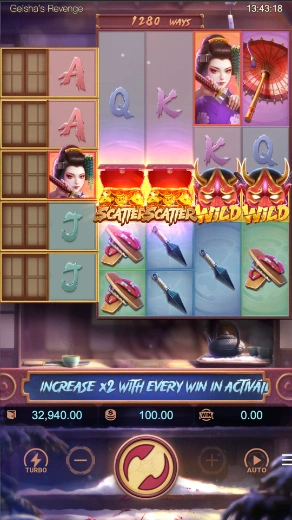
The first reel has five individual rows, each with a window to its left. The other four reels have six rows, and some of their symbols can occupy more than one space. This is why the left edge is a more reliable starting point for the multiplier feature than trying to assign a window to every large picture anywhere in the grid.
In the main-game example, the windows look closed and inactive. The manufacturer sets them inactive at the start of each main-game spin. A large geisha on a later reel, or a prominent umbrella picture, does not activate a left window simply by being present.
The ways count sits above the grid. The document gives 240 to 6,480 ways and says a symbol occupying two to four spaces counts as one symbol in payout calculations. That is separate from the five first-reel row positions that control the multiplier windows.
Find the winning first-reel symbol, then its row
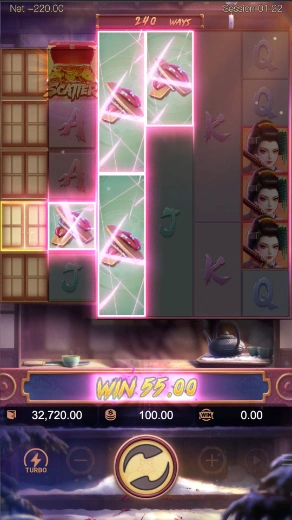
The rule uses a winning symbol in row one, two, three, four or five of reel one. After the win is paid, its corresponding row window either activates if inactive, or increases its multiplier if already active. The example highlights accessory symbols and the fourth window beside the first reel. It lets you connect a qualifying first-reel position with one particular window.
This condition is more specific than “a symbol landed” or “the spin paid somewhere.” A non-winning picture in a first-reel row does not meet the stated winning-symbol condition. A winning picture on a later reel does not, by its own row number, choose a different left window either. Start with the first reel’s contribution to the win.
The update follows payment of the win. That helps explain why an animation can show a highlighted combination, an opening window and then cleared spaces across several states. It is not necessary to declare one intermediate picture the final settled cash result to understand which row is updating.
An already active row increases again
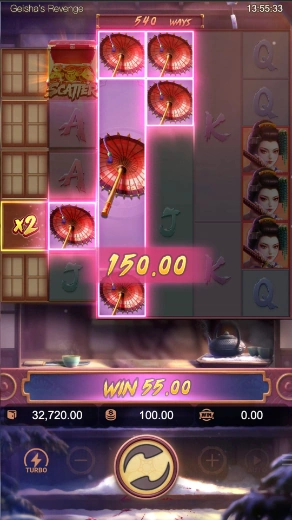
The umbrella example includes the fourth row of the first reel beside an active ×2 window. The same row can be involved in later winning rounds within the spin. When it is already active, the documented update increases that row’s multiplier by two after the win is paid.
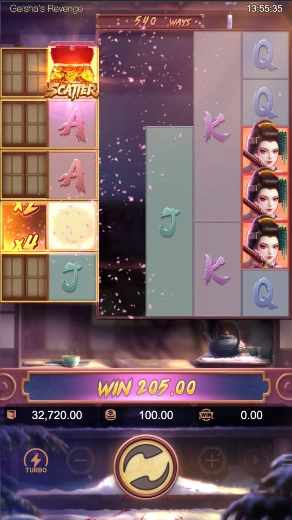
The next illustration shows the fourth window’s ×2-to-×4 transition while the winning position clears. That is a row-specific update. It does not say that every other window also doubles, or that every new symbol falling into the grid is worth another two. The winning-row condition still decides which window is affected.
Activation and increase are alternative branches of the rule. A closed window must first be activated; an active one follows the increase condition. Do not count one win twice by treating it as both the first activation and an additional active-window increase on the same basis.
Add the row values at the end of the spin
At the end of the spin, wins are multiplied by the current total sum of the multipliers. It is the sum that matters, rather than a product of all five windows or a choice of whichever single window is largest.
For a hypothetical completed state, suppose the active windows show ×2 and ×4, and the spin’s win before this end-of-spin multiplier is 10. The summed multiplier is 6, giving 10 × 6 = 60. Using 10 × 2 × 4 would give 80 and would substitute multiplication for the documented addition. The invented amounts explain the formula; they are not amounts reconstructed from the umbrella animation.
| Situation | Window rule | Timing or boundary |
|---|---|---|
| Main-game spin starts | All five windows inactive | Start of each main spin |
| Winning first-reel row, inactive window | Corresponding row activates | After the win is paid |
| Winning first-reel row, active window | Corresponding multiplier increases by two | After the win is paid |
| Spin finishes | Use the current sum of multipliers | End-of-spin win calculation |
| Free-spins feature starts | Windows inactive at feature entry | Do not carry the prior main spin’s windows into entry |
Free spins preserve the windows across the feature

Three Scatters anywhere award ten free spins; each additional Scatter adds two. The official opening example displays twelve. That does not change the base award to twelve: the rule allows extra spins for additional Scatters. The opening image alone does not show the entire trigger grid, so it should not be used to invent a specific unpictured sequence of symbols.
At the start of the free-spins feature, the five windows are set inactive. The winning-first-reel-row activation and increase conditions continue to apply. The important difference is retention: the window multipliers remain until the end of the free-spins feature, rather than being set inactive at the start of every ordinary main-game spin.
At the end of each free spin, its wins use the current sum of those multipliers. Free spins can retrigger. Neither retention nor retriggering turns a row multiplier into a separate wallet balance, or establishes that it stays permanently after the feature ends.
The real ×42 example can be checked directly
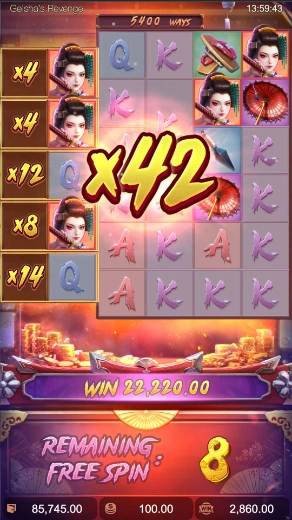
Read the left edge from top to bottom: ×4, ×4, ×12, ×8 and ×14. Adding those values gives 4 + 4 + 12 + 8 + 14 = 42, matching the central ×42 animation. This arithmetic uses the numbers actually visible in that manufacturer frame; it does not require inventing earlier winning rows.
The eight near the bottom says how many free spins remain. It is not an additional row multiplier, so it does not belong in the sum. The large cash Win display is a third kind of value. Understanding the ×42 total does not by itself reconstruct every underlying win, update or animation step that produced the cash amount.
The other screenshots illustrate separate states of the documented feature. They are not presented as one continuous session from first activation to the ×42 frame. In particular, the twelve-spin opening and eight-spin state do not supply a complete account of every consumed or retriggered free spin between them.
Keep substitution and the maximum win separate
Wild symbols substitute for eligible symbols other than Scatter and appear on reels two to five. They can contribute to a qualifying combination, but the multiplier update still depends on the winning symbol’s position in reel one. A Wild mask elsewhere is not a command to activate every left-hand window.
The specified maximum win is 5,000 times the bet amount. The manufacturer states that a main-game or free-spins total reaching that amount ends the spin. This is a result limit expressed relative to the stake, not a prediction about a currently increasing row window or a reason to treat a large displayed multiplier as an amount already paid.
Does the same physical row stay valuable forever?
No permanent carryover is described. The relevant boundaries are a main spin and, separately, the current free-spins feature. The window values explain a state under those rules; they do not predict where the next winning symbol will appear.
Source: PG SOFT, Geisha’s Revenge English game information, version 1.0.r4, pages 3–9, document updated 13 August 2026 and retrieved 18 November 2026. Images are actual manufacturer example game screens. They do not establish current availability or identical settings on Vegas11, and they are not an author’s play record.